XML 序列化程式產生器工具
.NET程式在做XML序列化時,在效能上表現並不佳,因此提供了XML 序列化程式產生器工具來改善這個問題。使用XML 序列化程式產生器工具,可為指定組件中的型別建立 XML 序列化 (Serialization) 組件,以改善 XmlSerializer 在序列化或還原序列化指定型別物件時的啟動效能。
如果未使用 XML 序列化程式產生器,為指定組件中的型別建立XML 序列化組件。則每當應用程式執行時,XmlSerializer 便會為每個型別產生序列化程式碼和序列化組件,造成XML序列化緩慢。
何謂XML序列化組件呢?換句話說就是使用XML 序列化程式產生器所產生出來的檔案,也就是檔案命名後半部為XmlSerializers.dll的檔案,像是Data.XmlSerializers.dll。
這邊我們可以寫個簡單的程式來觀察這個現象,程式碼如下:
Imports System.Xml.Serialization
Imports System.IO

Public Class Form1

    Private Sub Button1_Click(ByVal sender As System.Object, ByVal e As System.EventArgs) Handles Button1.Click
        Dim count As Integer = 1
        Dim perosn As New Person
        Dim xs As New XmlSerializer(GetType(Person))
        Dim sw As Stopwatch = Stopwatch.StartNew
        Using ms As New MemoryStream
            For i As Integer = 0 To count - 1
                ms.Seek(0, SeekOrigin.Begin)
                xs.Serialize(ms, perosn)
            Next
        End Using
        MsgBox("ElapsedMilliseconds: " & sw.ElapsedMilliseconds)
    End Sub
End Class

Public Class Person
    Private _name As String
    Public Property Name() As String
        Get
            Return _name
        End Get
        Set(ByVal value As String)
            _name = value
        End Set
    End Property

    Private _year As Integer
    Public Property Year() As Integer
        Get
            Return _year
        End Get
        Set(ByVal value As Integer)
            _year = value
        End Set
    End Property
End Class
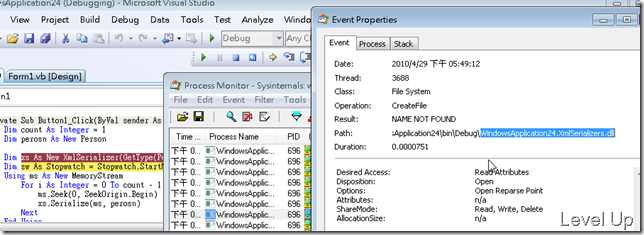
運行後用ProcessMonitor去觀察,可發現當第一次執行到建立XmlSerializer物件的程式碼時,背後就在偷偷的找尋並試圖建立XML序列化組件。
使用XML 序列化程式產生器工具
要熟悉如何使用XML 序列化程式產生器工具來加速XML序列化的動作,先來看一下Sgen.Exe的用法。
Usage: sgen.exe [[/assembly:
[/type:] [/reference:] [/compiler:] [/debug] [/keep] [/nologo]

[/silent] [/verbose]
Developer options:
**/assembly:   Assembly location or display name. Short form is '/a:'.**    /type:       Generate code for serialization/deserialization of a single

             type from the input assembly. Short form is '/t:'.

/reference:  Reference metadata from the specified assembly files.

             Short form is '/r:'.

/compiler:   Visual C# compiler options to use while compiling generated

             code. Short form is '/c'.

             For complete list of available options see c# compiler help.

/proxytypes  Generate serialization code only for proxy classes and web

             method parameters. Short form is '/p'.

/debug       Generate image which can be used under a debugger.

             Short form is '/d'.

/keep        Keep source code and compiler temp files. Short form is '/k'.

**/force       Forces overwrite of a previously generated assembly.

             Short form is '/f'.**    /out:        Output directory name (default: target assembly location).

             Short form is '/o:'.

/parsableerrors

             Print errors in a format similar to those reported by

             compilers.
Miscellaneous options:
/? or /help  Show this message

/nologo      Prevents displaying of logo. Short form is '/n'.

/silent      Prevents displaying of success messages. Short form is '/s'.

**/verbose     Displays verbose output for debugging. Short form is '/v'.**                 List types from the target assembly that cannot be serialized

             with XmlSerializer.
最簡單的用法就是直接在命令後面接上組件名稱,像是:
Sgen XXX.dll
若產生的檔案可能已經存在,可加上/f參數強迫覆蓋。而若無法正確的產生XML序列化組件,可加上/v參數顯示造成無法產生的錯誤訊息。
使用上可在[專案]→[屬性]→[編譯]→[建置事件]內的建置後事件加上如下命令(命令路徑請依電腦實際狀況去做調整):
“%ProgramFiles%\Microsoft SDKs\Windows\v7.0A\bin\sgen.exe” /a:"$(TargetPath)" /force
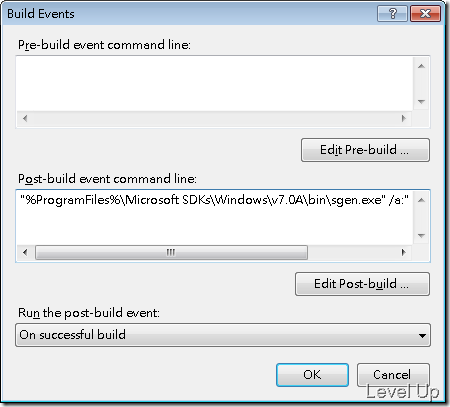
如此建置後將在輸出目錄自動產生對應的XML序列化組件,將產生的XML序列化組件與自己撰寫的組件放在一起,序列化的速度就會提升了。
若仍嫌速度緩慢,也可以把產生的序列化組件加入參考,匯入Microsoft.Xml.Serialization.GeneratedAssembly命名空間,改用序列化組件內的Serializer取代XmlSerializer,像是:
Imports System.Xml.Serialization
Imports System.IO
Imports Microsoft.Xml.Serialization.GeneratedAssembly

Public Class Form1

    Private Sub Button1_Click(ByVal sender As System.Object, ByVal e As System.EventArgs) Handles Button1.Click
        Dim count As Integer = 1000
        Dim perosn As New Person
        Dim xs As New PersonSerializer
        Dim sw As Stopwatch = Stopwatch.StartNew
        Using ms As New MemoryStream
            For i As Integer = 0 To count - 1
                ms.Seek(0, SeekOrigin.Begin)
                xs.Serialize(ms, perosn)
            Next
        End Using
        MsgBox("ElapsedMilliseconds: " & sw.ElapsedMilliseconds)
    End Sub
End Class
效能測試
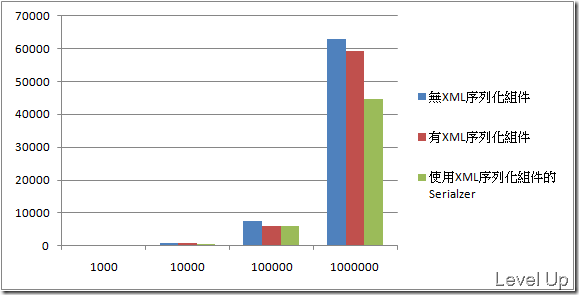
這邊針對校能的改進作了一些測試,測試的CODE沿用上面的範例,實驗數據與結果如下:
| 次數 | 無XML序列化組件 | 有XML序列化組件 | 使用XML序列化組件的Serialzer |
| 1000 | 125 | 107 | 84 |
| 10000 | 946 | 884 | 597 |
| 100000 | 7382 | 5909 | 5924 |
| 1000000 | 62892 | 59159 | 44779 |
Link
- XML 序列化程式產生器工具 (Sgen.exe)