LogDevice 安裝完後,可以啟動 Local cluster 試試。
調用 ld-dev-cluster 命令即可啟動 Local cluster。
./_build/bin/ld-dev-cluster
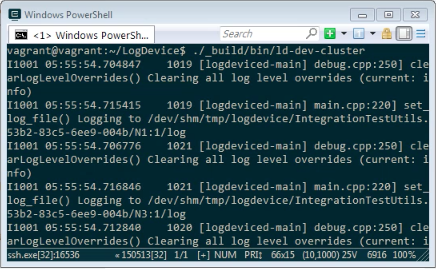
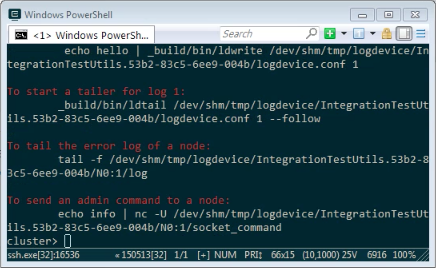
Local cluster 會建立暫存的目錄、啟動五個節點。
啟動時會顯示如下畫面,提示我們可以使用的命令,及怎樣操作。
...
Cluster running. ^C or type "quit" or "q" to stop. Commands:

        replace <nid>   Replace a node (kill the old node, wipe the existing data, start a replacement). Do not wait for rebuilding.
        start <nid>     Start a node if it is not already started.
        stop <nid>      Pause logdeviced by sending SIGSTOP. Waits for the process to stop accepting connections.
        resume <nid>    Resume logdeviced by sending SIGCONT. Waits for the process to start accepting connections again.
        kill <nid>      Kill a node.
        expand <n>      Add new nodes to the cluster.
        shrink <n>      Remove nodes from the cluster.


To create a log range:
        ldshell -c /tmp/logdevice/IntegrationTestUtils.8b62-42b5-1e7a-7cec/logdevice.conf logs create --from 1 --to 100 --replicate-across "node: 2" test_logs

To write to log 1:
         echo hello | _build/bin/ldwrite /tmp/logdevice/IntegrationTestUtils.8b62-42b5-1e7a-7cec/logdevice.conf 1

To start a tailer for log 1:
        _build/bin/ldtail /tmp/logdevice/IntegrationTestUtils.8b62-42b5-1e7a-7cec/logdevice.conf 1 --follow

To tail the error log of a node:
        tail -f /tmp/logdevice/IntegrationTestUtils.8b62-42b5-1e7a-7cec/N0:1/log

To send an admin command to a node:
        echo info | nc -U /tmp/logdevice/IntegrationTestUtils.8b62-42b5-1e7a-7cec/N0:1/socket_command

NOTE: Internal LogsConfig Manager is ENABLED.
You will need to use ldshell to create logs and provision before use
cluster>