要將資料塞入 LiteDB,需先準備一個用來存放資料的 Model,該 Model 跟一般的 Model 沒什麼太大的不同,不需要特別加掛 Attribute,只需要為 Model 加上一個 ID 的數值屬性,讓 LiteDB 用以識別資料。
public class MyModel
{
public int ID { get; set; }
...
}
再來準備要塞入的資料,ID 值不用填,LiteDB 會自行填入。
var collectionItem = new T()
{
...
};
最後將 LiteDB 開啟,取得對應的 Collection,用 Collection.Insert 將資料塞入即可。
…
using (var db = new LiteDatabase(dbFile))
{
  var collection = db.GetCollection<T>(collectionName);
  ...
  collection.Insert(collectionItem);
}
程式撰寫起來會像下面這樣:
using System;

namespace LiteDB.Demo1
{
    class Program
    {
        static void Main(string[] args)
        {
            using (var db = new LiteDatabase("Person.db"))
            {
                var persons = db.GetCollection<Person>("persons");

                var larry = new Person
                {
                    Name = "Larry Nung",
                    NickName = "Larry"
                };

                persons.Insert(larry);
            }
        }
    }

    public class Person
    {
        public int ID { get; set; }
        public String Name { get; set; }
        public String NickName { get; set; }
    }
}
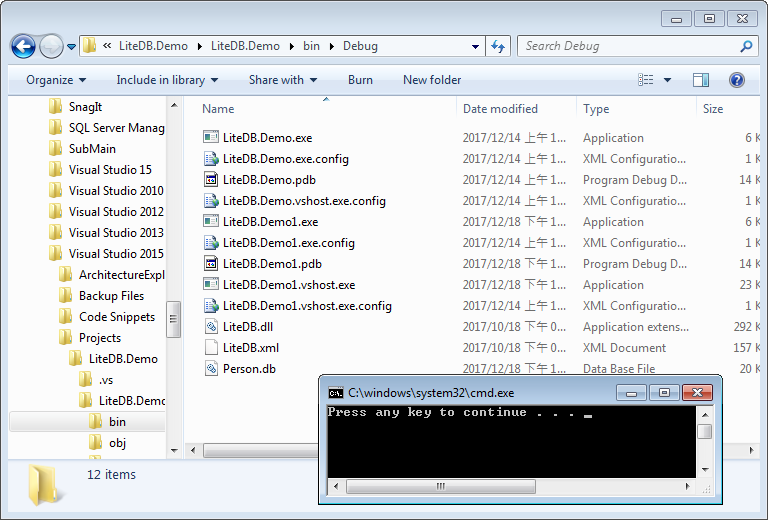
運行起來會將資料寫入指定的 LiteDB。
除了單筆的塞值,Collection.Insert 也允許塞入多筆資料,只要調用 Collection.Insert 時帶入資料的集合即可。
…
using (var db = new LiteDatabase(dbFile))
{
  var collection = db.GetCollection<T>(collectionName);
  ...
  collection.Insert(collectionItems);
}
像是下面這樣:
using System;
using System.Diagnostics;
using System.Linq;

namespace LiteDB.Demo3
{
    class Program
    {
        static void Main(string[] args)
        {
            using (var db = new LiteDatabase("Person.db"))
            {
                var persons = db.GetCollection<Person>("persons");
                var count = 1000000;
                var data = Enumerable.Range(1, count).Select(item => new Person
                {
                    Name = "Larry Nung " + item,
                    NickName = "Larry " + item
                }).ToArray();
                persons.Insert(data);
            }
        }
    }

    public class Person
    {
        public int ID { get; set; }
        public String Name { get; set; }
        public String NickName { get; set; }
    }
}
除了 Collection.Insert,也可以使用 Collection.InsertBulk 塞入多筆資料,調用 Collection.InsertBulk 並帶入資料的集合與批次的大小,資料就會依指定的批次大小批次塞入。
…
using (var db = new LiteDatabase(dbFile))
{
  var collection = db.GetCollection<T>(collectionName);

  collection.InsertBulk(data, batchSize);
}
像是下面這樣:
using System;
using System.Diagnostics;
using System.Linq;

namespace LiteDB.Demo3
{
    class Program
    {
        static void Main(string[] args)
        {
            using (var db = new LiteDatabase("Person.db"))
            {
                var persons = db.GetCollection<Person>("persons");
                var count = 1000000;
                var data = Enumerable.Range(1, count).Select(item => new Person
                {
                    Name = "Larry Nung " + item,
                    NickName = "Larry " + item
                }).ToArray();
                persons.InsertBulk(data);
            }
        }
    }

    public class Person
    {
        public int ID { get; set; }
        public String Name { get; set; }
        public String NickName { get; set; }
    }
}
這邊筆者針對這兩個方法做了個簡單的效能比較。
using System;
using System.Diagnostics;
using System.Linq;

namespace LiteDB.Demo3
{
    class Program
    {
        static void Main(string[] args)
        {
            using (var db = new LiteDatabase("Person.db"))
            {
                var persons = db.GetCollection<Person>("persons");
                var counts = new[] {100, 1000, 10000, 100000, 1000000};

                foreach (var count in counts)
                {
                    var data = GetData(count);
                    Console.WriteLine("Insert, count {0}, {1} ms", count, DoTest(1, () =>
                    {
                        persons.Insert(data);
                    }));


                    data = GetData(count);
                    Console.WriteLine("InsertBulk, count {0}, {1} ms", count, DoTest(1, () =>
                    {
                        persons.InsertBulk(data);
                    }));
                }
            }
        }

        static Person[] GetData(int count)
        {
            return Enumerable.Range(1, count).Select(item => new Person
            {
                Name = "Larry Nung " + item,
                NickName = "Larry " + item
            }).ToArray();
        }

        static long DoTest(int count, Action action)
        {
            var sw = Stopwatch.StartNew();
            for (int i = 0; i < count; ++i) action();
            return sw.ElapsedMilliseconds;
        }
    }

    public class Person
    {
        public int ID { get; set; }
        public String Name { get; set; }
        public String NickName { get; set; }
    }
}
運行結果如下:
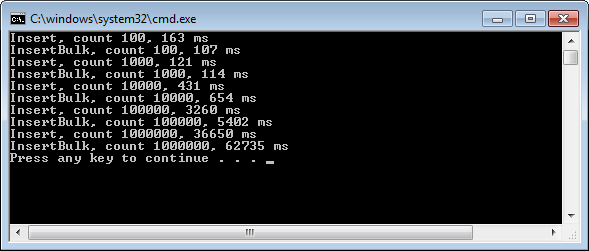
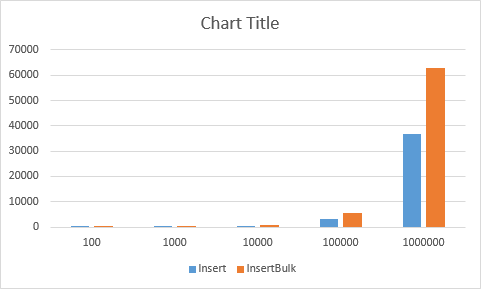
可以看到使用 Insert 去塞入大量資料在速度上會優於 InsertBulk,但兩者在記憶體耗量之類的也會有所出入,使用哪個方法比較恰當還是需要多方的評估。