C# 6.0 以前,集合類別可以像下面這樣透過 Collection Initializers 初始集合成員:
...
var blogs = new List<Blog>
{
    new Blog( "Level Up 1", "http://www.dotblogs.com.tw/larrynung" ),
    new Blog( "Level Up 2", "http://larrynung.github.io" )
};
...
但無法像 VB 10 以後的版本一樣透過擴充方法客製處理 Collection Initializers 的動作,一直到 C# 6.0 才被加入 C# 內。
只要為集合撰寫 Add 擴充方法即可客製處理 Collection Initializers,像是如果預期要讓 List
...
public static class BlogExtension
{
    public static void Add(this List<Blog> list, string name, string url)
    {
        list.Add( new Blog(name, url));
    }
}
...
集合成員的初始就可以像下面這樣撰寫:
...
blogs = new List<Blog>
{
    { "Level Up 1", "http://www.dotblogs.com.tw/larrynung" },
    { "Level Up 2", "http://larrynung.github.io" }
};
...
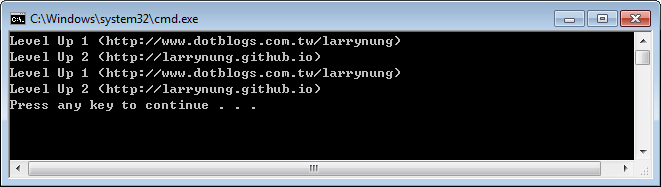
最後附上完整的測試範例:
using System;
using System.Collections.Generic;

public class Program
{
    static void Main(string[] args)
    {
        var blogs = new List<Blog>
        {
            new Blog( "Level Up 1", "http://www.dotblogs.com.tw/larrynung" ),
            new Blog( "Level Up 2", "http://larrynung.github.io" )
        };

        DumpBlogs(blogs);

        blogs = new List<Blog>
        {
            { "Level Up 1", "http://www.dotblogs.com.tw/larrynung" },
            { "Level Up 2", "http://larrynung.github.io" }
        };

        DumpBlogs(blogs);
    }

    private static void DumpBlogs( List<Blog> blogs)
    {
        foreach ( var blog in blogs)
            Console.WriteLine( string.Format( "{0} ({1})", blog.Name, blog.Url));
    }
}
public class Blog
{
    public string Name { get; set; }
    public string Url { get; set; }
    public Blog(string name, string url)
    {
        this.Name = name;
        this.Url = url;
    }
}

public static class BlogExtension
{
    public static void Add(this List<Blog> list, string name, string url)
    {
        list.Add( new Blog(name, url));
    }
}
運行結果如下: